
You tap on a contact to send a quick text and suddenly you are staring at three different entries for the same person. One has their old number, another has their email but no phone number, and the third has a nickname you do not remember creating. Duplicate contacts are one of the most common and most frustrating digital clutter problems, but they are also one of the easiest to fix.
This step by step guide walks you through how to remove duplicate contacts on any platform, so you can get back to a clean address book that actually works.
How Duplicate Contacts Happen
Before you start deleting, it helps to understand why duplicates appear in the first place. Knowing the cause helps you prevent them from coming back.
The most common culprit is syncing contacts across multiple accounts. If you use an iPhone that syncs with iCloud, a Gmail account, a work Exchange account, and maybe a social media platform or two, you can easily end up with two, three, or even four entries for the same person. Each service creates its own version of the contact, and without proper merge settings, they all show up separately in your address book.
Other common causes include importing contacts from a CSV file that overlaps with existing entries, manually saving a contact you already have (perhaps with a slightly different name spelling), and restoring contacts from a backup that creates copies of entries that already exist.
Step 1: Go to the Dextr home screen
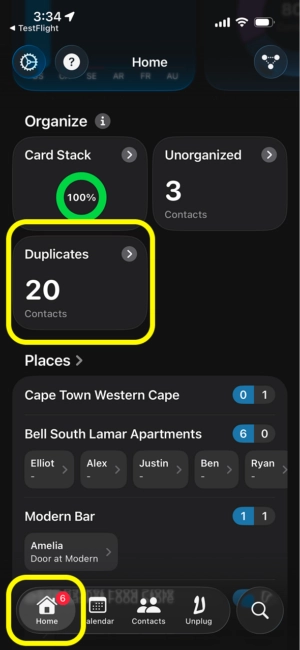
Navigate to the Dextr "Home" screen by tapping "Home" in the lower left corner of the app.
Next, scroll down until you see the "Duplicates" feature in the "Organize" section and tap it.
Step 2: View your Duplicates list
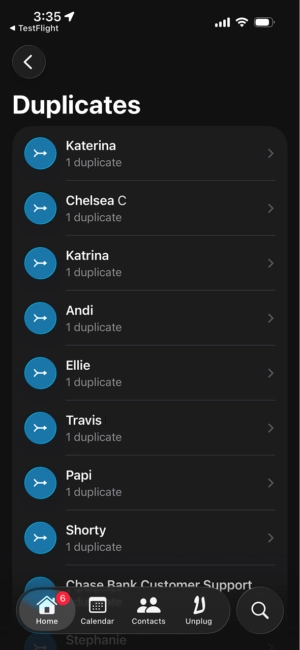
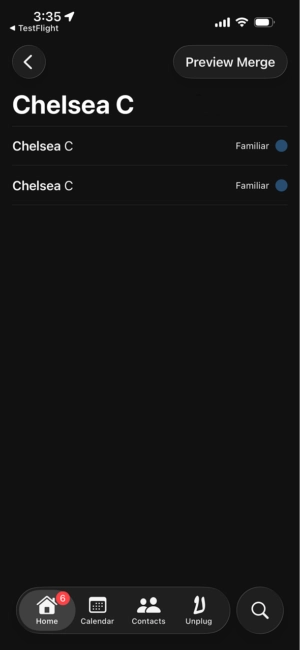
In the "Duplicates" screen, you will see all contacts that share either phone numbers or email addresses. Tapping a contact will show you each entry that is duplicated. You can also tap the entries to see the contact profile of each entry. Tap "Preview Merge" when you are ready to move onto the final step of merging a contact.
Step 3: Confirm the merge
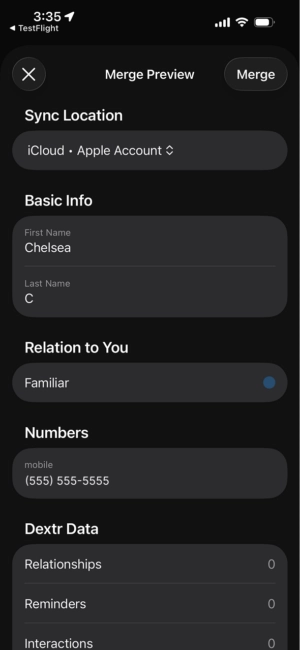
On the final merge screen you will see the data that will be merged together. Dextr will merge all information including Dextr specific fields such as relationships and tags. Tap "Merge" to complete the process.
That's It!
Dextr helps you maintain a single, clean source of truth for all your contacts. By centralizing your contact management in one purpose built app, you reduce the risk of duplicates forming across scattered accounts and services.
Beyond just storing names and numbers, Dextr lets you add tags, notes, and relationship context to every contact. This makes it easier to identify when you might be about to create a duplicate, because you can see detailed information about each person at a glance. The app is designed around the idea that your contacts deserve more than a basic phone book, and that keeping them organized should be simple rather than stressful.
Ready to say goodbye to duplicate contacts for good? Try Dextr and see the difference a personal CRM makes.


